How to Track Social Media Campaigns with Different Links for Each Platform
If you publish the same offer on Facebook, Instagram, TikTok, and WhatsApp, and use the same link everywhere, you may see the total number of clicks at the end. But you will not know which platform actually brought the result.
Did Facebook bring the visits? Was Instagram better? Did TikTok bring views but no clicks? Was WhatsApp the strongest channel?
This is why using different links for each platform matters.
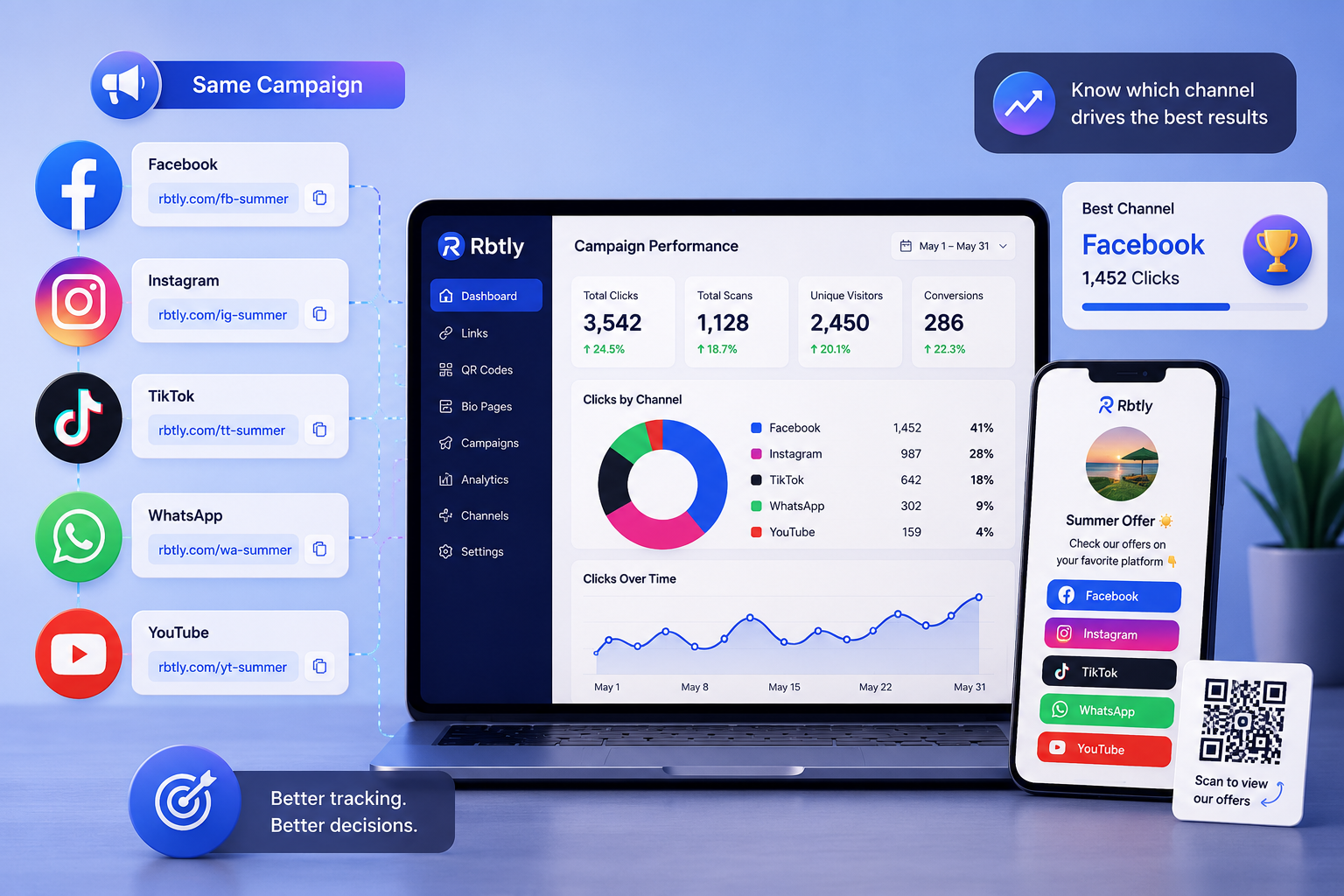
Instead of using one link across all channels, create a separate link for every platform, then compare performance. This turns your social media links from simple destinations into measurable marketing assets.
What Does Social Media Link Tracking Mean?
Social media link tracking means you do not use the same link everywhere. Instead, you create a different link for each platform, post, campaign, or channel.
For example:
- A link for Facebook.
- A link for Instagram.
- A link for TikTok.
- A link for WhatsApp.
- A link for a QR Code if you also have printed materials.
Each link can lead to the same page or offer, but each link is tracked separately.
Instead of only knowing that your campaign generated 500 clicks, you can understand:
- How many clicks came from Facebook?
- How many clicks came from Instagram?
- How many clicks came from TikTok?
- How many clicks came from WhatsApp?
- Which channel deserves more focus or budget?
If you want to understand the idea of trackable links from the beginning, read: What Is a Smart Link?.
Why Is Using the Same Link Everywhere a Problem?
Using the same link on every platform may seem easier, but it creates a major problem in analysis.
You end up with one general number, but that number does not explain where performance came from.
For example, if you publish the same offer on:
- A Facebook post.
- An Instagram story.
- A TikTok caption.
- A WhatsApp broadcast.
And you use the same link everywhere, then get 300 clicks, you will not know:
- Did Facebook bring most of the visits?
- Was the Instagram story effective?
- Did TikTok bring real traffic or only views?
- Was WhatsApp the strongest source?
This makes your marketing decisions based on guessing.
You may think that the platform with the highest likes is the best one, but it may not be the platform that generated the most clicks.
Likes Are Not Enough to Measure Performance
Many marketers, creators, and small business owners measure post performance through likes, comments, and reach.
These numbers are useful, but they are not enough.
Engagement does not always mean that someone took action.
A post may get high engagement but generate very few visits. Another post may get fewer likes but bring serious clicks from people who are actually interested.
So it is better to ask:
- Who clicked the link?
- Which platform brought clicks?
- Which content pushed people to take the next step?
- Which channel should we repeat or improve?
This is where links become part of your performance measurement, not just a way to send people somewhere else.
What Are Channel-Based Links?
Channel-Based Links are links created for specific channels or platforms.
Instead of using one link for everything, you create one link for each traffic source.
Example:
Channel | Link Type | Purpose |
|---|---|---|
Facebook-specific link | Track Facebook visits | |
Instagram-specific link | Track Instagram visits | |
TikTok | TikTok-specific link | Track TikTok visits |
WhatsApp-specific link | Track visits and messages | |
QR Code | QR-specific link | Track scans from printed materials |
All of these links can open the same page or offer, but each one gives you separate data.
If your campaign includes QR Codes or printed materials, you may also find this useful: How to Track QR Code Scans.
Practical Example: The Same Offer on 4 Platforms
Imagine you have a new offer and want to publish it across several channels.
The offer is the same. The final destination is the same. But the links are different:
- One link for Facebook.
- One link for Instagram.
- One link for TikTok.
- One link for WhatsApp.
After two days or one week, you review the results.
You may find something like this:
Channel | Clicks | What It Means |
|---|---|---|
180 | Strong traffic source | |
95 | Good, but may need a clearer CTA | |
TikTok | 30 | More views than visits |
220 | Strongest source of interested users |
Now the decision becomes clearer.
Instead of saying “the campaign worked,” you can say:
- Facebook brought good traffic.
- WhatsApp brought stronger interest.
- Instagram needs a different content test.
- TikTok worked better for awareness than conversion in this campaign.
This is the real value of tracking links by platform.
How to Use Different Links for Each Platform Step by Step
1. Define the Campaign Goal
Before creating links, define your goal.
Do you want:
- Visits to an offer page?
- WhatsApp messages?
- Course registrations?
- Product page visits?
- File downloads?
- Traffic to a Bio Page?
Defining the goal helps you understand what to measure after publishing the links.
2. Create a Separate Link for Each Channel
Do not use the same link everywhere.
Create a separate link for every channel:
- Facebook link.
- Instagram link.
- TikTok link.
- WhatsApp link.
- QR Code link if you have printed materials.
Each link should be named clearly so you can later understand which result belongs to which channel.
3. Use the Same Final Destination When Needed
Different links do not always mean different pages.
You can create several links and send all of them to the same final page.
The goal is not to change the destination. The goal is to separate traffic sources.
If you need a simple page that collects your offer, WhatsApp, products, and social links, read: Best Link in Bio Tool for Small Businesses.
4. Use a Clear CTA on Every Platform
A link alone is not enough.
Every platform needs a CTA that matches how people use it.
Examples:
- On Facebook: View the offer details here.
- On Instagram: Open the link and see the products.
- On TikTok: Details are in the link.
- On WhatsApp: Click here to book or order.
A clear CTA can bring more clicks and cleaner data.
5. Review Results After Publishing
After publishing the campaign, review every link separately.
Do not only look at the total number of clicks.
Compare:
- Which platform brought more clicks?
- Which link generated real interest?
- Which channel did not perform well?
- Does the CTA need to change?
- Should you move focus or budget to another platform?
This review helps you improve the next campaign.
Why Is This Important for Small Businesses?
Small businesses often use more than one channel at the same time.
They may post on Facebook, reply on WhatsApp, show products on Instagram, and test TikTok for reach.
The problem is that they often do not know which channel actually brought the customer.
By using different links for each platform, a small business owner can understand:
- Where to focus effort.
- Which platform brings real interest.
- Whether people come from Instagram or Facebook.
- Whether WhatsApp is stronger than social media posts.
- Whether the business needs an organized page instead of sending scattered links.
If the business does not have a full website, a Bio Page or simple Landing Page can collect the offer, links, and contact options in one place.
To understand the difference between a Bio Page and a website, read: Bio Page vs Website.
Why Is This Important for Marketers and Agencies?
If you are a social media specialist or marketing agency, your client does not only need reach and likes.
The client wants to know whether the content generated visits or serious interest.
When you use different links for each platform, you can add stronger insights to your report:
- Facebook generated this number of clicks.
- Instagram generated this number of clicks.
- WhatsApp generated this number of clicks.
- QR Code generated this number of scans.
- The best-performing channel was this one.
This makes the report clearer than only showing reach and engagement.
It also creates an opportunity to offer a better service: campaign link organization and tracking, not only content publishing.
What Is the Difference Between Link Tracking and UTM Tracking?
Some marketers use UTM parameters to track traffic sources inside tools like Google Analytics.
This is very useful, but it can be too technical for many small business owners or non-technical users.
Link tracking through a link management tool like Rbtly makes the idea easier:
- Create a link for each platform.
- Publish every link in the right place.
- Track clicks from one dashboard.
- Compare results more easily.
This does not replace UTM tracking in every case, but it gives users a simpler way to measure campaign performance quickly and clearly.
How Rbtly Helps You Track Social Media Campaigns
Rbtly helps you create short, smart, and trackable links for every platform or campaign, then monitor performance from one place.
You can use Rbtly to:
- Create a different link for every channel.
- Track clicks for each link.
- Organize links by campaign.
- Compare Facebook, Instagram, TikTok, and WhatsApp performance.
- Use links with QR Codes in printed campaigns.
- Create a Bio Page or Landing Page for your offer.
- Build clearer reports for clients.
The idea is that Rbtly does not only help you shorten a link. It helps you understand what happens after people click.
If you want to know what to look for in a URL shortener with analytics, read: Best URL Shortener with Analytics.
Common Mistakes When Tracking Social Media Links
1. Using the Same Link Everywhere
This is the most common mistake.
It gives you a total number, but it does not show where performance came from.
2. Not Naming Links Clearly
If you create many links without clear names, it becomes harder later to know which link belongs to which channel or campaign.
3. Ignoring WhatsApp
Many businesses rely heavily on WhatsApp, but they do not track the links that lead to it.
This makes an important part of the customer journey unclear.
4. Measuring Clicks Without Context
Numbers need interpretation.
One platform may bring fewer clicks but better leads. Another platform may bring many clicks but little real interest.
5. Not Reviewing Results Before the Next Campaign
The goal of tracking is not only to collect numbers. The real goal is to improve the next decision.
Suggested Articles from Rbtly Blog
- What Is a Smart Link?
- Best URL Shortener with Analytics
- How to Track QR Code Scans
- Best Link in Bio Tool for Small Businesses
- Bio Page vs Website
- Best Bitly Alternative for Small Businesses and Creators
Conclusion
Social media campaign tracking should not depend only on likes and reach.
If you want to understand real performance, use different links for each platform.
This helps you know:
- Which platform brought more visits.
- Which content pushed people to click.
- Which channel deserves more focus.
- Whether the campaign really worked.
- How to improve the next campaign.
A link is not just a way to redirect people.
A link can become a measurement tool that helps you understand your audience and make better marketing decisions.
FAQ
What does social media link tracking mean?
It means creating different links for each platform, post, or campaign, then measuring the clicks on each link to understand where traffic and performance came from.
Why should I not use the same link on every platform?
Because one shared link only gives you a total number of clicks. It does not show whether the traffic came from Facebook, Instagram, TikTok, or WhatsApp.
Do I need a different link for every post?
For important campaigns, yes. A different link for every post helps you understand which content generated real clicks and which content did not perform well.
Is link tracking useful for small businesses?
Yes. It helps small business owners understand which platform brings real interest instead of relying only on likes, reach, or assumptions.
Is link tracking useful for agencies?
Yes. It helps agencies and marketers create clearer client reports that include clicks and traffic sources, not only reach and engagement.
How does Rbtly help track social media campaigns?
Rbtly helps you create different links for every platform or campaign, track clicks, organize links, and compare channel performance from one place.