How to Track WhatsApp Link Clicks: 7 Smart Ways from Ads, QR Codes, and Bio Pages
How to Track WhatsApp Link Clicks is an important question for businesses that use WhatsApp to receive orders, leads, bookings, questions, and customer messages.
Many small businesses share the same WhatsApp link everywhere: Facebook, Instagram, TikTok, QR Codes, flyers, Bio Pages, ads, and websites. The problem is simple: if the same link is used everywhere, it becomes hard to know where the clicks came from.
That is why learning How to Track WhatsApp Link Clicks matters. With Rbtly, you can create trackable WhatsApp links, use different links for different channels, and understand which campaign or platform sends people to WhatsApp.
Create your first trackable WhatsApp link with Rbtly
Table of Contents
- What does it mean to track WhatsApp link clicks?
- Why WhatsApp link tracking matters
- How to Track WhatsApp Link Clicks
- What you can and cannot track with WhatsApp links
- Best use cases for WhatsApp link tracking
- Why use Rbtly for WhatsApp link tracking?
- WhatsApp link tracking checklist
- FAQ
What does it mean to track WhatsApp link clicks?
To track WhatsApp link clicks means measuring how many people clicked a link that opens a WhatsApp chat.
A WhatsApp link usually sends users directly to a chat with your business. This is useful for sales, support, orders, bookings, and customer questions.
But a normal WhatsApp link does not always tell you where the user came from.
For example, if you put the same WhatsApp link on Facebook, Instagram, a QR Code, and a flyer, you may receive messages, but you may not know which channel created the first click.
This is why many businesses need to understand How to Track WhatsApp Link Clicks using trackable short links.
With Rbtly, you can create a short trackable link that redirects to your WhatsApp chat. This helps you measure clicks before the user opens WhatsApp.
Why WhatsApp link tracking matters
WhatsApp is often one of the most important customer communication channels for small businesses.
Customers may use WhatsApp to ask about prices, reserve a seat, order a product, book a service, request support, or ask for more details.
But without WhatsApp link tracking, the business may not know which marketing activity created the conversation.
For example:
- Did the click come from a Facebook ad?
- Did the click come from Instagram bio?
- Did the click come from a QR Code on a flyer?
- Did the click come from a Bio Page?
- Did the click come from TikTok?
- Did the click come from a printed menu?
When you know the source of WhatsApp link clicks, you can make better marketing decisions.
You can invest more in the channels that bring real action and improve the channels that do not perform well.
How to Track WhatsApp Link Clicks
Here is How to Track WhatsApp Link Clicks using Rbtly and a clear campaign structure.
1. Create your WhatsApp destination link
The first step is to create the WhatsApp link that opens a chat with your business.
This link can include your phone number and a pre-filled message, such as:
Hello, I would like to know more about your offer.
A clear message helps users start the conversation faster.
You can use WhatsApp links for product questions, bookings, consultations, course registration, restaurant orders, service requests, and customer support.
2. Create a trackable short link in Rbtly
After creating your WhatsApp destination, create a trackable short link in Rbtly.
This short link becomes the link you share in your campaigns.
When someone clicks the Rbtly short link, Rbtly can record the click and then redirect the user to WhatsApp.
This is one of the easiest ways to understand How to Track WhatsApp Link Clicks without making your workflow complicated.
3. Create a different WhatsApp link for each channel
One of the biggest mistakes is using the same WhatsApp link everywhere.
If you use one link for all channels, you may get clicks, but you will not clearly know which channel brought them.
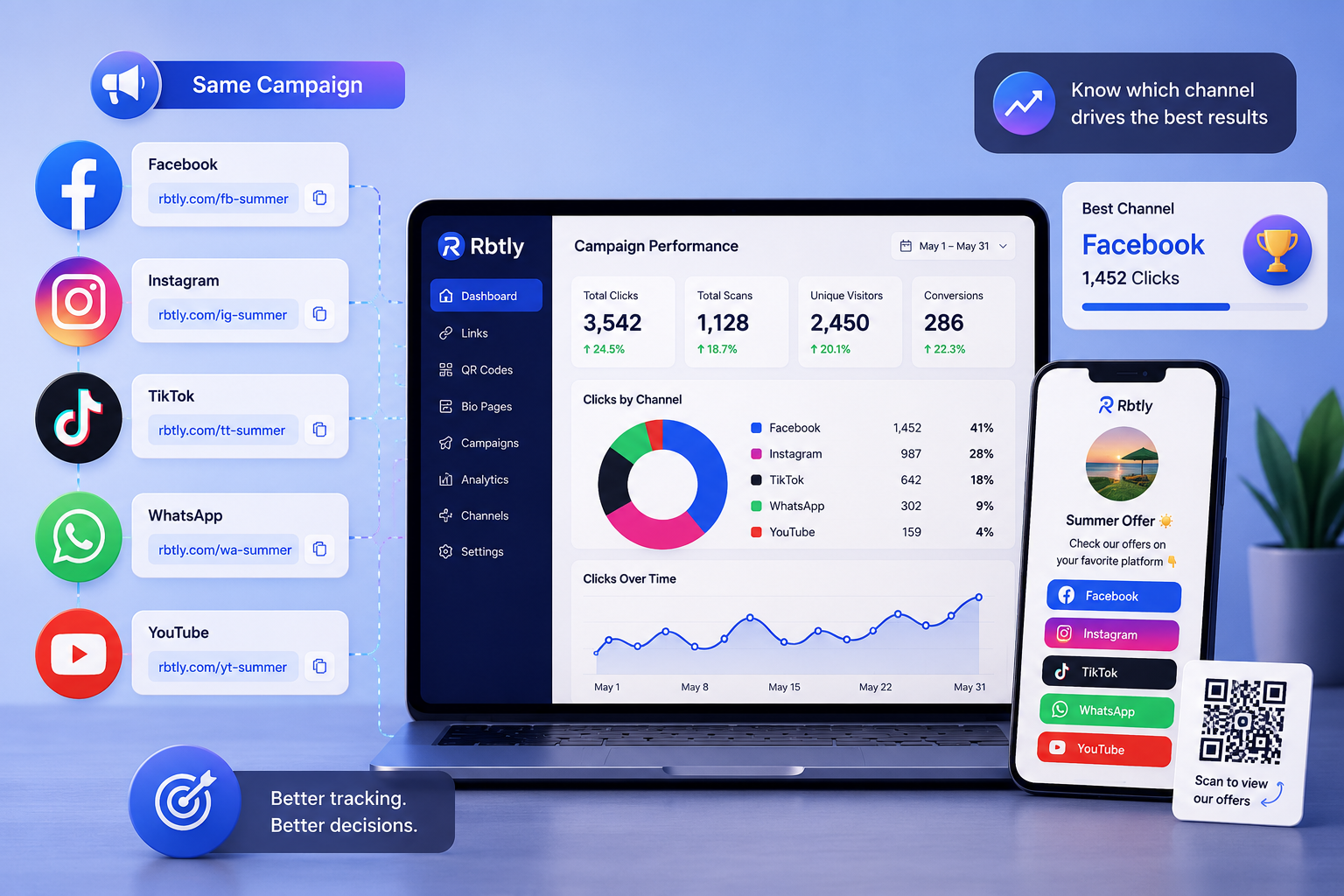
A better approach is to create a different trackable WhatsApp link for each channel.
For example:
- One WhatsApp link for Facebook.
- One WhatsApp link for Instagram.
- One WhatsApp link for TikTok.
- One WhatsApp link for QR Codes.
- One WhatsApp link for flyers.
- One WhatsApp link for your Bio Page.
This helps you compare channels more clearly.
4. Use WhatsApp links in ads
If you use ads to drive people to WhatsApp, tracking the click source is important.
You can create separate trackable WhatsApp links for each ad campaign, ad set, or platform.
For example, you can create one link for a Facebook ad, another for an Instagram ad, and another for a TikTok campaign.
This helps you understand which ad channel sends more people to WhatsApp.
You can also use structured campaign parameters with tools like Google Campaign URL Builder if you need extra campaign tracking.
5. Use WhatsApp links with QR Codes
QR Codes are useful when you want to send offline users to WhatsApp.
For example, you can place a QR Code on a flyer, menu, poster, business card, packaging, event banner, or table card.
Instead of making the QR Code open a normal WhatsApp link directly, you can use a trackable Rbtly link that redirects to WhatsApp.
This helps you measure QR Code scans and WhatsApp link clicks from offline materials.
Explore Rbtly QR Codes here: Rbtly QR Codes.
6. Add WhatsApp links to your Bio Page
A Bio Page is useful when you want to collect multiple important links in one place.
You can add a WhatsApp link to your Bio Page, along with social media links, product links, offers, booking links, payment links, forms, and location links.
With Rbtly, you can use a Bio Page as a central destination and include a trackable WhatsApp link inside it.
This is useful for creators, teachers, restaurants, service providers, freelancers, and small businesses.
Explore Rbtly Bio Pages here: Rbtly Bio Pages.
7. Compare clicks and improve your campaigns
Tracking is only useful when you use the data to make better decisions.
After creating separate WhatsApp links for different channels, compare the results.
Ask questions like:
- Which platform brought the most WhatsApp clicks?
- Which QR Code generated more WhatsApp interest?
- Which ad campaign drove more clicks?
- Which Bio Page button performed better?
- Which printed material led to more WhatsApp visits?
This helps you stop guessing and start improving your campaigns based on real click data.
What you can and cannot track with WhatsApp links
It is important to understand what WhatsApp link tracking can and cannot measure.
What you can track
With a trackable short link, you can track the click before the user opens WhatsApp.
This can help you understand:
- How many people clicked the WhatsApp link.
- Which channel generated the click.
- Which campaign link performed better.
- Which QR Code or Bio Page sent users to WhatsApp.
- Which country or device data is available from the click.
What you cannot always track
A WhatsApp link click does not always mean that the user sent a message.
Someone may click the link, open WhatsApp, and leave without sending anything.
So, the most accurate way to evaluate WhatsApp marketing is to compare link clicks with the actual messages and leads you receive inside WhatsApp.
Rbtly helps you track the click source. Your sales or support process should also record whether that click became a real conversation, lead, order, or booking.
Best use cases for WhatsApp link tracking
Once you know How to Track WhatsApp Link Clicks, you can use this strategy across many business situations.
Small business offers
A small business can create different WhatsApp links for different offers.
This helps the business know which offer brought more clicks and conversations.
Restaurant orders
Restaurants can create trackable WhatsApp links for delivery orders, table reservations, menu questions, and special offers.
They can place these links inside QR Codes, Bio Pages, social media posts, and flyers.
Course registration
Teachers and course creators can use WhatsApp links for student registration, parent questions, payment details, and class information.
Tracking helps them know whether registrations came from a QR Code, Instagram, Facebook, or a Bio Page.
Agencies and client campaigns
Agencies can create separate WhatsApp links for each client campaign.
This helps them show clients which channel created more WhatsApp interest.
Print campaigns
Print shops and businesses can add trackable WhatsApp links to QR Codes on flyers, posters, business cards, menus, and packaging.
This turns printed materials into measurable lead sources.
Why use Rbtly for WhatsApp link tracking?
Rbtly helps you create short, trackable links that can redirect users to WhatsApp.
This makes Rbtly useful for businesses that want to understand How to Track WhatsApp Link Clicks from different campaigns and channels.
With Rbtly, you can:
- Create trackable WhatsApp links.
- Create different links for different channels.
- Use WhatsApp links in ads.
- Add WhatsApp links to QR Codes.
- Add WhatsApp links to Bio Pages.
- Track clicks before WhatsApp opens.
- Compare channels and campaigns.
- Improve marketing decisions using analytics.
Rbtly also supports QR Codes, Bio Pages, short links, and link analytics, so you can manage your campaign links from one platform.
You can also learn more about WhatsApp click to chat links from WhatsApp Help Center.
How to Track WhatsApp Link Clicks checklist
Use this checklist when setting up WhatsApp link tracking.
- Create a clear WhatsApp destination link.
- Add a useful pre-filled message when needed.
- Create a trackable short link in Rbtly.
- Create a different link for each channel.
- Use separate links for Facebook, Instagram, TikTok, QR Codes, and Bio Pages.
- Name each link clearly.
- Track clicks regularly.
- Compare clicks with actual WhatsApp messages.
- Improve campaigns based on the best-performing channels.
This checklist helps you make WhatsApp a more measurable marketing channel.
Final thoughts
Learning How to Track WhatsApp Link Clicks can help you understand where your leads and customer conversations start.
Instead of sharing the same WhatsApp link everywhere, create separate trackable links for ads, QR Codes, Bio Pages, social media, and printed materials.
This helps you measure which channels bring people to WhatsApp and which campaigns deserve more focus.
With Rbtly, you can create trackable WhatsApp links, use them with QR Codes and Bio Pages, and compare clicks across your marketing channels.
Start tracking your WhatsApp link clicks with Rbtly
FAQ
How to Track WhatsApp Link Clicks?
You can track WhatsApp link clicks by creating a trackable short link that redirects to your WhatsApp chat. With Rbtly, you can create different WhatsApp links for ads, QR Codes, Bio Pages, and social media channels, then compare clicks.
Can I track WhatsApp messages with a link?
A trackable WhatsApp link can track the click before WhatsApp opens, but it does not always confirm that the user sent a message. To measure real leads, compare link clicks with actual WhatsApp conversations.
Why should I create different WhatsApp links for each channel?
Different WhatsApp links help you know which channel generated the click. This makes it easier to compare Facebook, Instagram, TikTok, QR Codes, Bio Pages, and printed campaigns.
Can I use WhatsApp links with QR Codes?
Yes. You can create a QR Code that opens a trackable WhatsApp link. This helps you measure WhatsApp clicks from flyers, menus, posters, packaging, business cards, and events.
Can I add a WhatsApp link to a Bio Page?
Yes. You can add a trackable WhatsApp link to a Bio Page alongside other links like products, offers, forms, social media, payment links, and booking pages.
Is WhatsApp link tracking useful for ads?
Yes. WhatsApp link tracking helps you compare which ad platform or campaign sends more people to WhatsApp.
Does Rbtly support WhatsApp link tracking?
Yes. Rbtly helps you create trackable links that can redirect users to WhatsApp, so you can measure clicks and compare campaign sources.
What is the best way to track WhatsApp link clicks?
The best way is to create a separate trackable WhatsApp link for each channel, use clear campaign names, track clicks regularly, and compare clicks with actual messages or leads inside WhatsApp.