QR Code Menu for Restaurants and Cafes: How to Use It Smartly
Using a QR Code for menus has become common in restaurants and cafes.
A customer sits at the table, scans the code with a phone, and opens the menu instead of waiting for a printed one.
But many restaurants still use a QR Code menu in a very basic way: a code that opens only a PDF.
That can be useful, but it does not use the full potential of a QR Code.
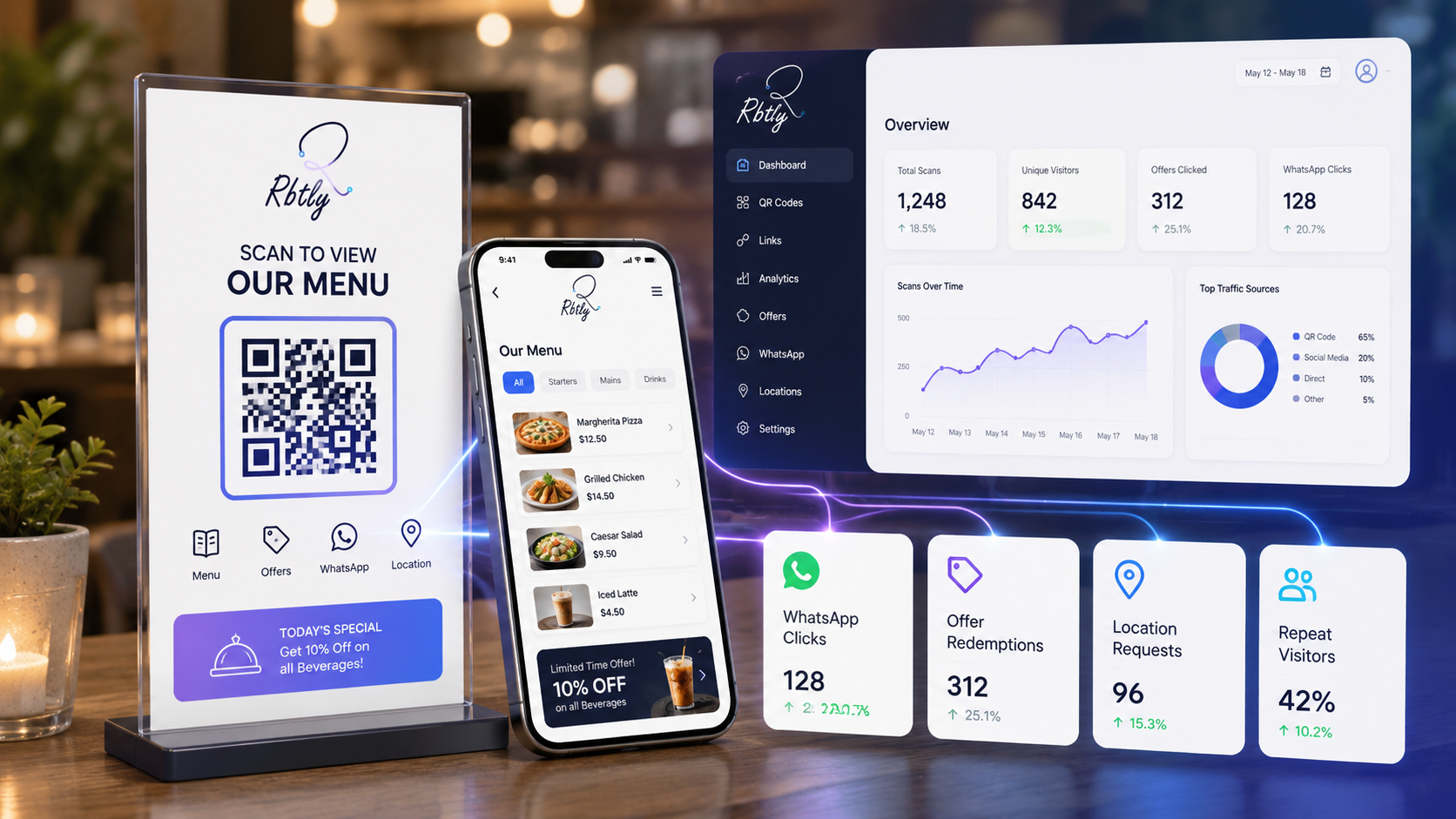
A QR Code menu can be more than a way to open a food list. It can help you organize the customer experience, show offers, guide orders, open WhatsApp, track scans, and understand what customers are interested in.
What Is a QR Code Menu?
A QR Code Menu is a QR Code that opens a menu or a dedicated page for a restaurant or cafe when a customer scans it with a mobile phone.
It can open:
- A PDF menu.
- An organized digital menu page.
- A page that includes the menu and current offers.
- A page with WhatsApp for booking or ordering.
- A page with location and social media links.
- A restaurant or cafe Bio Page.
The goal is not only to help customers open the menu quickly. The goal is to give them a clear experience that helps them take the next step easily.
Why Do Restaurants and Cafes Need a QR Code Menu?
1. Faster Customer Experience
Customers do not need to wait for a printed menu.
Once they scan the QR Code on the table or counter, they can open the menu immediately.
This makes the ordering experience faster, especially during busy hours or when the staff is occupied.
2. Easier Menu and Offer Updates
Printed menus need to be redesigned and reprinted whenever prices, items, or offers change.
A digital menu is easier to update, especially when it is connected to an organized page instead of a static file.
You can update:
- Today’s offers.
- Unavailable items.
- New dishes or drinks.
- Product photos.
- Ordering or booking links.
3. Less Confusion for Customers
If a customer needs the menu, location, WhatsApp, offers, or Instagram account, do not make them search in many places.
It is better to place everything inside one clear page.
That is why a QR Code menu can open a page that includes the menu, offers, and contact links, instead of only opening a PDF file.
4. Scan Tracking
One of the most important benefits of using a QR Code smartly is measurement.
Instead of asking, “Are people opening the menu?”, you can start tracking:
- How many people scanned the code?
- Which branch received more scans?
- Are people clicking the offers inside the page?
- Are people clicking WhatsApp?
- Does the table QR Code perform better than the counter QR Code?
If you want to understand QR scan tracking in more detail, read: How to Track QR Code Scans.
A QR Code Menu Does Not Have to Open Only a PDF
Many restaurants use a QR Code that opens a PDF menu.
This is simple, but it is not always the best experience.
A PDF menu can be:
- Slow to load.
- Hard to read on mobile screens.
- Difficult to update quickly.
- Missing a clear CTA.
- Not helpful enough for ordering or contacting the restaurant.
In many cases, it is better to open an organized page that includes the menu, offers, and contact buttons.
For example, one page can include:
- Menu link.
- Today’s offers.
- WhatsApp button for booking or ordering.
- Location.
- Instagram and Facebook links.
- Photos of best-selling items.
- Reviews or rating link.
If you want to create one page that collects the most important business links, read: How to Create a Professional Bio Page for Your Small Business Without a Full Website.
What Should a Smart Menu Page Include?
1. A Clear and Easy-to-Read Menu
The first thing customers look for is the menu.
So access to it should be clear from the beginning of the page.
The menu can be:
- An organized page.
- A lightweight and mobile-friendly PDF.
- Images divided by menu sections.
- A catalog or external menu page.
The most important thing is that it should be mobile-friendly and easy to browse.
2. Today’s Offers or Current Promotions
A QR Code menu is a great place to show current offers.
The customer has opened the page while already interested, so it makes sense to show a clear offer.
Examples:
- Meal of the day.
- Discount on a specific drink.
- Special combo.
- WhatsApp ordering offer.
- Discount for the next order.
3. WhatsApp Button for Booking or Ordering
If your restaurant or cafe uses WhatsApp for booking or orders, the button should be visible.
Do not make customers search for the phone number or leave the page to type it manually.
A WhatsApp button can say:
- Book your table on WhatsApp.
- Order now on WhatsApp.
- Ask about offers.
- Contact the branch.
If you want to track where WhatsApp messages come from, read: Smart WhatsApp Links: How to Track Where Your Messages and Leads Come From.
4. Location and Branches
If you have more than one branch, make branch access clear.
The page can include:
- Google Maps link for each branch.
- Working hours.
- Contact number.
- Ordering or booking links for each branch.
This is especially useful when customers view the menu and want to visit the nearest branch.
5. Social Media Links
A digital menu can also help you grow your social media following.
Add Instagram, Facebook, and TikTok links if they are active and important for your restaurant or cafe.
But do not let social media links distract customers from the main goal, which is viewing the menu, ordering, or booking.
6. Reviews or Ratings
Customer reviews help build trust.
You can add a reviews link or a button asking customers to leave a review after their visit.
This is useful for restaurants and cafes that depend on reputation and recommendations.
Where Should You Place a QR Code Inside a Restaurant or Cafe?
The placement of your QR Code matters.
It is not enough for the code to exist. It must be visible and easy to scan.
1. On Tables
The table is usually the best place for a menu QR Code.
Customers sit down, see the code directly, and scan it without asking.
2. At the Counter
This is useful for cafes and restaurants where customers order at the counter.
It helps customers check the menu quickly before ordering.
3. On the Printed Menu
Even if you still use printed menus, you can add a QR Code to them.
This is useful for opening updated offers, product photos, or ordering pages.
4. On Flyers or Cards
If you distribute flyers or cards inside orders, add a QR Code that opens the menu, offers, or WhatsApp.
This turns the printed material from a simple paper into a measurable channel.
If you use QR Codes in printed campaigns, read: How to Use QR Codes in Offline Marketing and Track Results.
5. On Packaging
If you offer takeaway or delivery, you can place a QR Code on packaging.
The code can open:
- The menu.
- An offer for the next order.
- WhatsApp.
- A review page.
- Social media links.
How to Use a QR Code Menu in a Trackable Way
1. Use a Separate QR Code for Each Place or Branch
If you have more than one branch, do not use the same QR Code everywhere.
It is better to create a separate QR Code for each branch so you can understand which branch gets more scans.
You can also create different codes for tables, counters, flyers, or packaging.
2. Connect the Code to a Clear Page
Do not make the QR Code open a crowded or non-mobile-friendly page.
The page should be:
- Fast.
- Clear.
- Mobile-friendly.
- Easy to tap.
- Focused on the menu.
- Built around a clear CTA.
3. Add a CTA Beside the QR Code
Do not place the code alone without explanation.
Add a short CTA beside it:
- Scan to open the menu.
- View today’s offers.
- Open the menu and order on WhatsApp.
- Scan to see prices.
4. Monitor the Results
After placing the QR Code inside the restaurant or cafe, monitor its performance.
Ask:
- How many people scanned it?
- Which place inside the branch generated more scans?
- Are people clicking the WhatsApp button?
- Are offers getting clicks?
- Is there a difference between branches?
- Should you change the QR placement or CTA text?
These insights help you improve both the customer experience and the campaign.
Important Note Before Printing a QR Code Menu
Before printing any QR Code for your menu, test it carefully.
Make sure:
- It opens the correct page.
- The page works well on mobile.
- The menu is clear.
- The code size is suitable for printing.
- There is enough white space around the code.
- The CTA beside the code is easy to understand.
Important: if you use Dynamic QR inside Rbtly, approve the final QR Code version before printing. Editing QR data or link may change the QR Code design, so after any update, use the new version in your updated designs or printed materials.
How Rbtly Helps with QR Code Menus
Rbtly helps restaurants and cafes create QR Codes, links, and pages that can be tracked.
You can use Rbtly to:
- Create a QR Code for your menu.
- Connect the QR Code to a menu page or Bio Page.
- Add WhatsApp for booking or ordering.
- Add location and social media links.
- Create a different QR Code for every branch or placement.
- Track clicks and scans.
- Understand which code or channel brings more interest.
- Use QR Codes on tables, flyers, cards, and packaging.
The point is that a QR Code menu should not be just a printed code. It can become a tool that improves the customer experience and measures engagement.
If you want to compare QR Code types, read: Static QR vs Dynamic QR Code: Differences, Use Cases, and Which One to Choose.
Common Mistakes When Using a QR Code Menu
1. Opening a Heavy PDF
If the menu does not load quickly, customers may leave the page.
2. Not Having a Clear CTA
A QR Code needs a sentence that explains what happens after scanning.
3. Using the Same Code in Every Branch
This makes it harder to compare performance between branches.
4. Not Testing the Code Before Printing
A small mistake in the link or design can make the QR Code useless after printing.
5. Ignoring Analytics
The goal is not only for customers to open the menu. The goal is also to understand how they interact with it.
Suggested Articles from Rbtly Blog
- How to Track QR Code Scans
- How to Use QR Codes in Offline Marketing and Track Results
- Static QR vs Dynamic QR Code: Differences, Use Cases, and Which One to Choose
- How to Create a Professional Bio Page for Your Small Business Without a Full Website
- Smart WhatsApp Links: How to Track Where Your Messages and Leads Come From
- Best Link in Bio Tool for Small Businesses
Conclusion
A QR Code menu is not just a way to open a PDF.
When used smartly, it can help a restaurant or cafe:
- Make menu access easier.
- Show current offers.
- Guide customers to WhatsApp or booking.
- Show location and social media links.
- Track scans.
- Compare performance between branches or QR placements.
- Turn the menu from a static file into a measurable experience.
If you run a restaurant or cafe, do not use your QR Code as decoration only.
Make it a touchpoint for communication, customer experience, and measurement.
FAQ
What is a QR Code Menu?
A QR Code Menu is a QR Code that opens a menu or a dedicated page for a restaurant or cafe. It can include the menu, offers, WhatsApp, location, and social media links.
Is a QR Code menu better than a printed menu?
It is not always a full replacement, but it helps customers open the menu quickly, makes updates easier, and can provide scan data.
Can I track a QR Code menu?
Yes. If the QR Code is connected to a system with tracking and analytics, you can track scans and clicks inside the page.
Where should I place a QR Code inside a restaurant?
You can place it on tables, counters, printed menus, flyers, cards, packaging, or inside the branch in a clear and easy-to-scan location.
Can a QR Code menu connect to WhatsApp?
Yes. A QR Code can open a page with a WhatsApp button for booking or ordering, or it can open a WhatsApp link directly.
How does Rbtly help restaurants and cafes?
Rbtly helps you create a QR Code menu, connect it to an organized page, add WhatsApp and location, and track scans and clicks from one place.